
Shared calendar
Practices, appointments, celebrations, and reminders in one calendar everyone can see.
Family Command Central (Fam Central) is a family organizer app: one shared calendar, shopping lists everyone can add to, and a family chat that turns messages into plans.


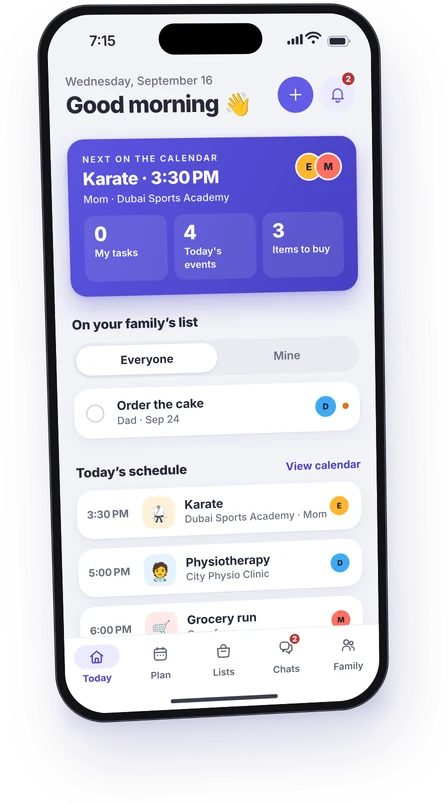
Mom, Dad, Emma and Noah in Dubai, on an ordinary Wednesday.
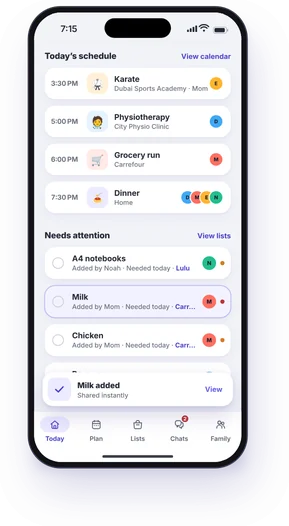
Before the school run, Mom adds milk. It’s on everyone’s shopping list straight away.
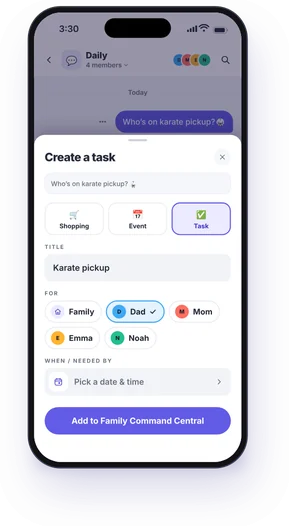
Mom asks in the family chat, then turns her message into a task for Dad. His phone tells him: Mom assigned you “Karate pickup”.
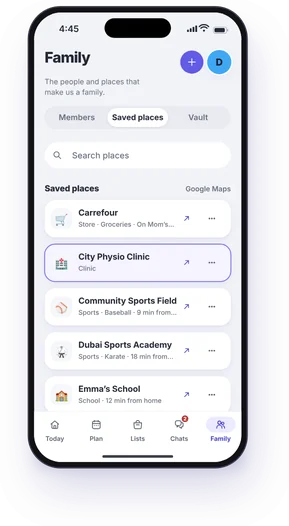
Dad finds City Physio Clinic in the family’s saved places. Directions are one tap away.
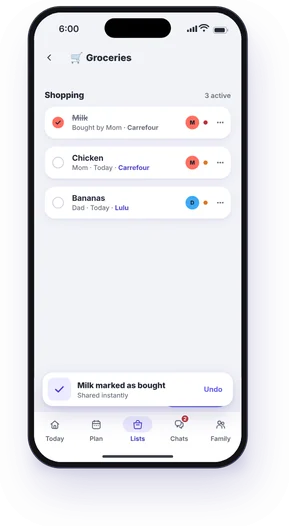
Mom ticks the milk at Carrefour. It’s ticked on Dad’s phone too, so nobody buys it twice.
Dinner at home. Nothing needs attention right now.
Capture what matters once, then let everyone see the same plan.
Practices, appointments, celebrations, and reminders in one calendar everyone can see.
Groceries, school supplies, and errands your family can add to and check off together.
Turn “Can someone grab milk?” into a shopping item, a task or an event, right from the chat.
Keep school, clinics, favourite shops, and regular destinations easy to find.
Bring tasks, dates, shopping, places, and chat together for trips, parties, and big plans.
Give everyone a clear view of what is happening and where they can help.
A spare tablet or the living-room TV can show what’s next, today and the week, open jobs and the shopping lists, big enough to read from the sofa.
An iPad or an Android tablet on the counter or the wall. It follows light and dark, and dims at night.
Today, the week and the lists on the big screen, moved around with the remote. It updates the moment someone changes a plan.
The same family day on an Android TV or a Google TV, with the D-pad to move around.
Family Screens come with Pro, up to 5 per family. A parent pairs one from their phone with the code the screen shows, and it never shows chats, the Vault or surprise projects. How Family Screens work
Free covers everyday family planning, and Pro gives you room to plan the year ahead. Pro starts with a 7-day free trial for new subscribers.
The everyday essentials for a smaller household.
Costs nothing, for your whole family.
No trial neededAvailable in the app today
More room for bigger families and bigger adventures.
Or $89.99 billed yearly
7-day free trialAvailable in the app today
Prices in USD, per family. Upcoming events only: the calendar shows as far ahead as your plan reaches, and past events can’t be viewed on any plan. Ads: Free shows one small banner ad to parents, never to children and never on a Family Screen or Apple TV, and the ads are never personalised. Pro has no ads. Your store shows the exact local price and whether you’re eligible for a trial before you subscribe. The Pro trial requires payment details and automatically renews at the selected monthly or yearly price unless cancelled before the trial ends. Manage or cancel any time in your App Store or Google Play subscription settings.
No. Free needs no subscription, and one Pro subscription covers your whole family, up to the 20 members Pro includes. Everyone joins with their own account, and a young child can be a profile without one.
Pro includes a 7-day free trial for new subscribers. After the trial, Pro renews at its monthly or yearly price. Cancel before the trial ends to avoid the first charge. Cancelling stops the next renewal, and the family keeps Pro until the end of the period it has paid for. After that the family is on Free: nothing is deleted, anything over Free’s limits is kept, and only new additions are blocked.
The calendar shows upcoming events only: the next 7 days on Free, or 13 months with Pro, which also brings in your Google, iCloud and Outlook calendars. Past events aren’t shown on any plan: the calendar is about what’s coming.
Parents on Pro get a private Vault for household paperwork — warranties, receipts, school letters — that children never see. Scanning reads a document and suggests its details (merchant, amount, dates, warranty expiry) for a parent to review before anything is saved. Each page uses one scan credit. Pro includes a 5 GB Vault, 100 scan credits a month and warranty expiry reminders. The Vault isn’t part of Free. Extra credit packs are not available yet.
Lite is now Free, and Plus isn’t sold any more. If your family still pays for one of them, you keep what you pay for until you cancel. You can cancel any time in your App Store or Google Play subscription settings, and everything your family has added stays.
Family Command Central uses secure sign-in and keeps each household’s information within that family.
Family Command Central, or Fam Central, is a family organizer app. One household shares a calendar, shopping lists, a family chat, tasks, saved places and projects, so everyone sees the same plan. It stays private to your family, with no public feed. Free is supported by small ads for parents only, and Pro has none.
Any household that shares a schedule: parents, children, grandparents and anyone else who helps. Parents run the family and its plan. Children can add things and tick them off. A young child can have a profile on the calendar and lists without an account of their own.
iPhone and iPad on the App Store, and Android phones and tablets on Google Play. An iPad, an Android tablet, an Apple TV, an Android TV or a Google TV can also be a Family Screen that shows the family’s day across the room, on the Pro plan, paired from a parent’s iPhone or Android phone. More on Family Screens.
A wall calendar and a whiteboard only help the person standing in front of them, and one person usually keeps them up to date. Fam Central puts the same plan on everyone’s phone, reminds people before things start, and turns a chat message into a task, an event or a shopping item. More in our guide to the digital family command center.
Cozi and TimeTree both have free versions paid for by ads. Fam Central has a free plan too, with one small banner ad for parents only, never for children, and no ads on Pro. Parents and children get different permissions, and the calendar sits next to shopping lists, tasks, a family chat that turns messages into plans, and a parents-only Vault for paperwork. Compare Fam Central vs Cozi and Fam Central vs TimeTree, including where each is the better pick.
Yes. What your family adds is visible only to your family; nothing is public. We don’t sell personal data, and the small ads on Free are never personalised. Children never see ads, and Pro has none. You sign in with Google or Apple, and you can delete your account from the app at any time.
Start your family home base, then invite everyone with a code or QR.